

This is the feature you have been waiting for. Just like PowerPoint, Google Slides now let's you add background music. No more crazy workarounds needed to get background music to play in your Google Slides. Google has finally integrated it’s new ‘Insert Audio” feature in Slides. It’s super easy to add audio, just follow the steps below.
STEP 1: Make sure you have added your MP3 or WAV audio files to Google Drive
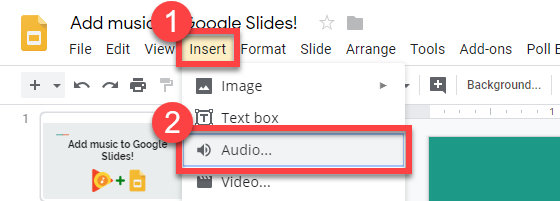
STEP 2: Open your Slides. Click Insert-Audio...
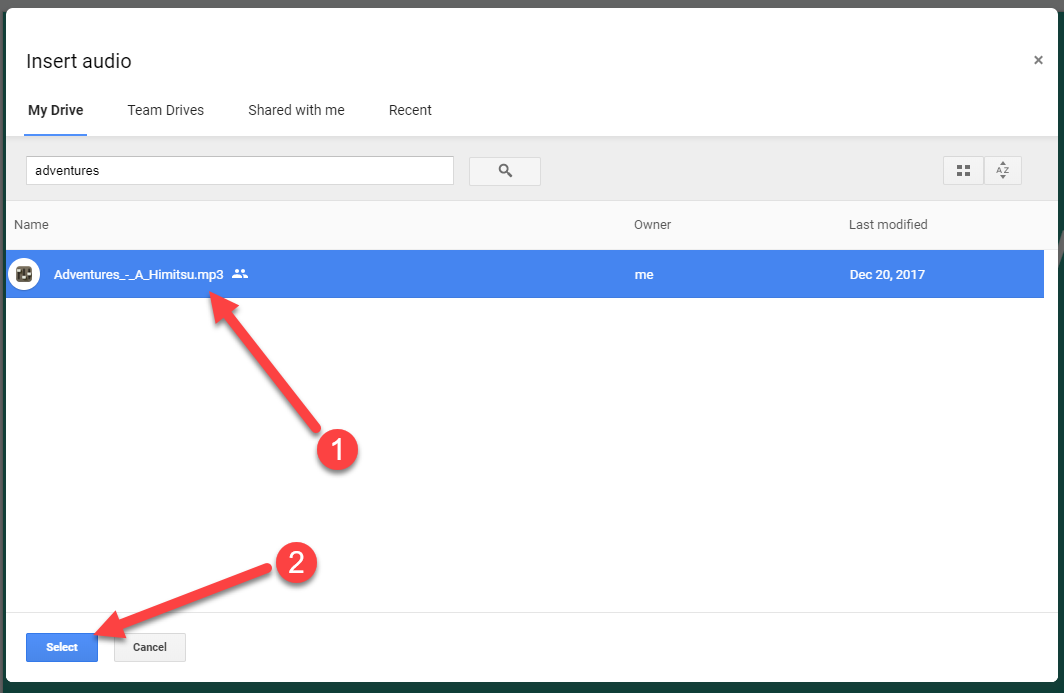
STEP 3: The search box automatically searches for any MP3 or WAV files in your Google Drive. Click on one mp3 file, then click Select
STEP 4: Your audio is now added. Hover over the icon to see the preview bar

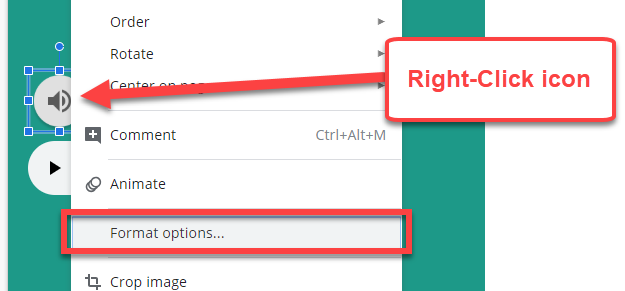
STEP 5: Right-click the audio icon to access some great formatting options
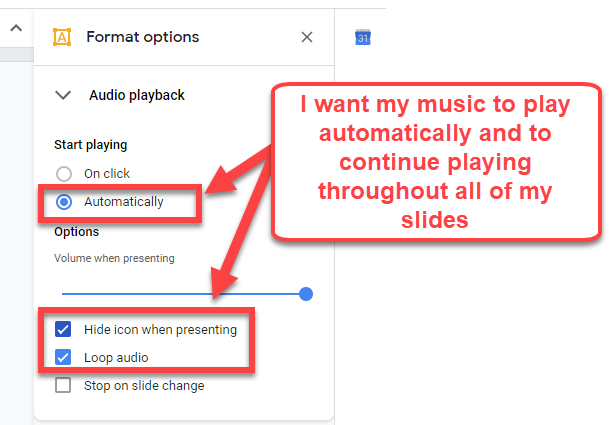
STEP 6: By default, the audio is set to play once the icon is clicked while presenting the slides. Also, by default, the audio is set to stop playing as soon as the next slide is advanced.
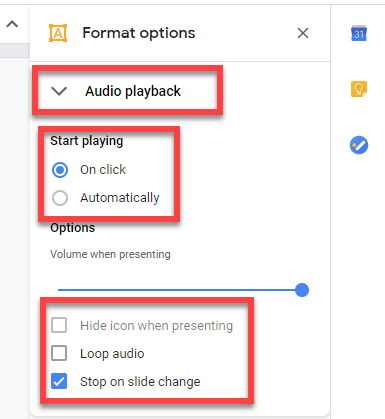
STEP 7: I like to change the settings so that the audio automatically starts to play without clicking on the icon. I also like to have the audio playing until the slideshow stops. You can even choose to hide the audio icon while presenting. *Note that there is not an option to choose which slide the audio should stop playing.
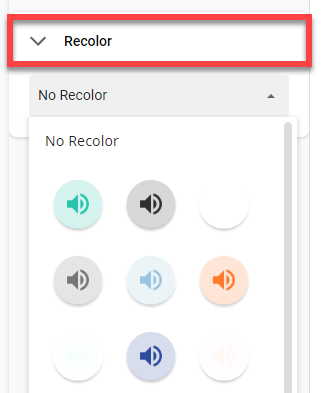
STEP 8: If interested, you can select a different color for your audio icon
In my account there is no such option to add sound. Is Google still testing this feature?
ReplyDeleteAn equipment glitch brought down the gift page usefulness, back-end announcing apparatuses, and the sparkling new constant pioneer sheets and information representation, across the board singular motion. friv jogos online
ReplyDeletejogos online 2019
friv jogos 4 school online
Thanks for this great post, i find it very interesting and very well thought out and put together. I look forward to reading your work in the future.
ReplyDeleteworld news
On the off chance that you search for it, you will discover music that is accessible to use for nothing.https://music.freemp3download.pro/index/O-Saki-Saki-From-Batla-House-Neha-Kakkar-Tulsi-Kumar-B-Praak-Tanishk-Bagchi-Vishal-Shekhar/
ReplyDeleteWe need to understand that businesses nowadays are paying premium for music at an all time high. Super selected
ReplyDeleteMusic is planned or sorted out sound. In spite of the fact that it can't contain feelings, it is here and there intended to control and change the feeling of the audience/audience members. Music made for films is a genuine case of its utilization to control feelings.
ReplyDeletehttps://many-ringtones.com/23209-chicken-lights-and-chrome.html
In any case, if a break was to occur, the worth (cost) of the LP may drop steeply and request could even evaporate totally. booking agentur
ReplyDeleteHow can I fade music when it goes to the next slide. I don't like how it stops abruptly. Thanks for your help!
ReplyDeleteThis comment has been removed by the author.
ReplyDeleteReally impressed! Everything is very open and very clear clarification of issues. It contains truly facts. Your website is very valuable. Thanks for sharing. site de música
ReplyDeleteKanarya Adaları yurtdışı kargo
ReplyDeleteKanada yurtdışı kargo
Kamerun yurtdışı kargo
Kamboçya yurtdışı kargo
Jersey yurtdışı kargo
ZJW75
D42D83E86A
ReplyDeletetakipçi satın al
Aşk Acısı Ne Zaman Geçer
İG Takipçi
Bayan Takipçi
Aşk Acısı İnsana Zarar Verir mi
ReplyDeleteWhen considering options for personalized apparel, many businesses turn to high-quality printing solutions to achieve their desired look. One popular choice is the custom dtf transfer, which offers vibrant colors and durability. These transfers are ideal for creating unique designs that stand out on various fabrics. For those seeking a reliable and customizable method, exploring custom dtf transfer options can make a significant difference. Ultimately, they provide a versatile solution for both small and large-scale printing needs.