

#1. Make sure to return all student work - Your students have worked hard on their Google Classroom assignments. Let’s make sure to return their digital work, just like we would return their paper/pencil work. This transfers ownership of the Google Doc, Sheet, or Slide back to the student (ownership was transferred to the teacher once students press the “turn in” button).
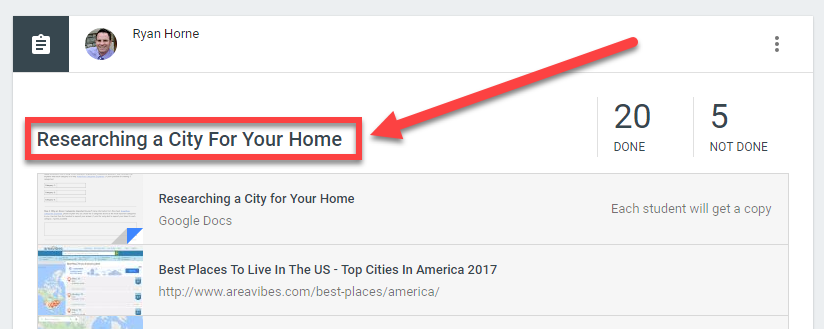
Step 1: Click the Assignment Title
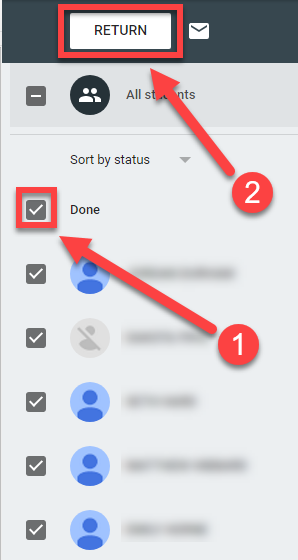
Step 2: Click the checkbox next to Done. This will automatically select all of the student work that has been “turned in”. Once checked, then click Return to return ownership back to the students.
#2 Archive your Google Classroom, do not remove, or unenroll students - Don’t attempt to keep this year’s Google Classroom, unenroll the current students, and then add next year’s students in the fall. That might seem like an easy way to stay organized, however there is a better method, it’s called archiving your Google Classroom. Archiving your Google Classroom still allows you to reuse any posts into other Google Classrooms you might create. When we delete students from a Google Classroom and then add new students in the fall it is too easy for us (the teachers) to keep doing things the same way we have in the past. All of our assignments, announcements, and questions are already in place, which might seem like a good thing, however true growth as a teacher comes from reflecting and adapting our assignments year to year. Archiving our Google Classroom gives us the opportunity to rethink an assignment each time we reuse a post. What should we keep the same? What should we change? Why?
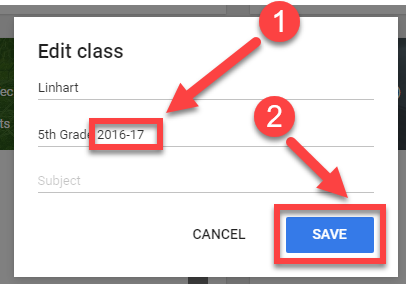
Step 1: From the Classes menu, make sure to add the current school year to your Google Classroom before you archive it.
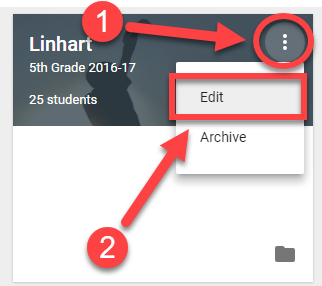
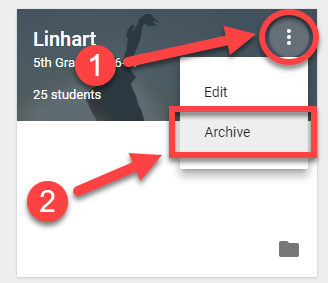
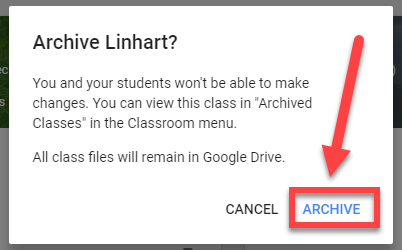
Step 2: Archive your Google Classroom.
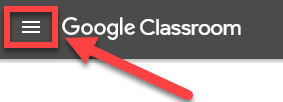
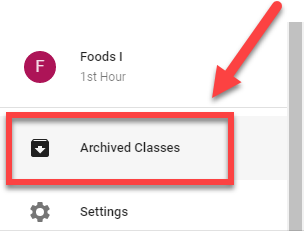
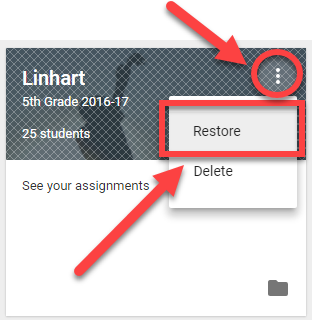
Step 3: Your Archived Google Classroom can be restored by clicking the Menu button and scrolling all the way down to find Archived Classes. Once you locate the archived class you would like to restore, click the 3 buttons icon and select Restore.
Thanks for all these wonderful tips for all teachers who are getting the hang of things, end of the year can get a little hectic sometimes. Keep up the good work.
ReplyDeleteThis comment has been removed by a blog administrator.
ReplyDeleteA good classroom layout could make the child's introduction to education a fun learning experience or customers reviews on Bid4Papers a nightmare that could have a lasting negative effect.
ReplyDeleteThank you, I have recently been searching for information approximately this topic for ages and yours is the greatest I have came upon so far. But, what in regards to the conclusion? Are you positive concerning the source? itunes sign in
ReplyDeleteThese are really a superb showcases here I am glad to have a review of it and feel to roll on its steps for my benefit always. jogos friv gratis 2019
ReplyDeleteJogos 2019
jogos friv
You can also make one-time payments toward your principal together with your yearly bonus from work, tax refunds, investment dividends or insurance payments. mortgage payment calculator canada The lender will seize the home, and may use the proceeds to cover the debt on the mortgage. mortgage payment calculator canada
ReplyDeleteThank you for sharingg
ReplyDeleteADEDBCE95F
ReplyDeletekiralık hacker
hacker arıyorum
belek
kadriye
serik
Excellent reminder and guidance! 🌟 Archiving Google Classrooms instead of deleting them is such a smart approach — it promotes reflection, improvement, and better organization for the next academic year. Just like an LT Panel Manufacturer ensures efficient power distribution for smooth operations, teachers who manage their digital classrooms effectively ensure a seamless flow of learning and growth. ⚡📚 Great insights for educators preparing for the new term! 👏
ReplyDelete