
Every once and awhile you need to include a special character in your Google Doc or Slides that you cannot find on your keyboard. Perhaps you are looking for a copyright symbol, the trademark symbol, a currency symbol, etc. Google Docs has a helpful built in tool to search and insert these characters.
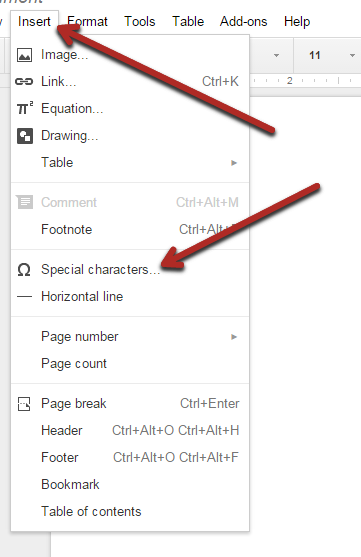
Step 1: Open up your Google Doc or Slide. Then click “Insert” on the menu bar and select “special characters…”
Step 2: You can sort characters by “categories”, “symbols”, or “arrows”.
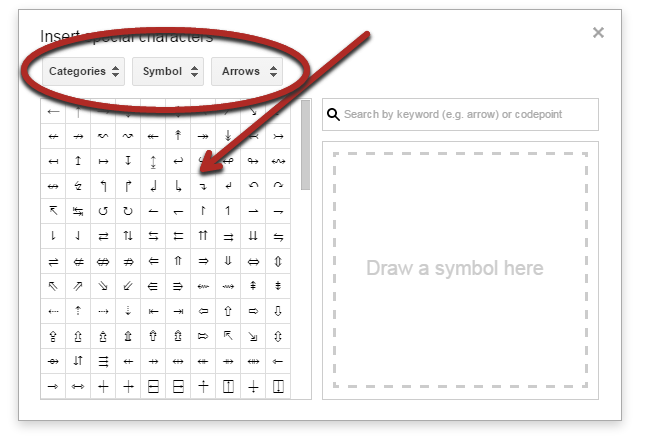
Step 3: You can also type in a term in the search box to narrow down the results.

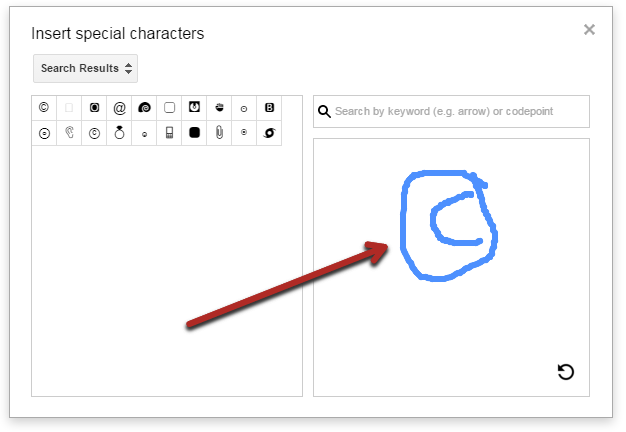
Step 4: My favorite feature, you can use your mouse to draw the special character that you are looking for and Google will try to find a match. So cool!
The other factors to look on include, the employee and the business partners’ satisfaction. Summary of the story is that, in this strategy, an investor should consider the overall picture of a business. aol com login
ReplyDeleteok
ReplyDeleteThis website basically beautiful points and things right. I know that you explain it in very good manner.
ReplyDeletebest autoketing, sales pop master app, email with love
THANK YOU SO MUCH!
ReplyDeleteThese articles are exactly what I need.I guess you are a smart cookie because of your knowledge and insight.I wait for them and always support you.
ReplyDeleteplay Rapunzel Fashionista Busy Day game Break The Cup For boy play Battle for the Galaxy
The registered symbol is always at the bottom of the company name, how do I get it at the top right corner please?
ReplyDeleteThanks for the valuable information and insights you have so provided here... Buy Bad Reviews
ReplyDelete
ReplyDeletefood games 2019
basketball games online
soccer games 2019
Thanks for the valuable information and insights you have so provided here...
Keep your PBR icy cold with these hilarious new koozies! Featuring many of your fave celebs in their moments of glory, these koozies are sure to make you giggle with each refreshing sip. If koozies aren't your thang, we've got 'em in coin purses too!
ReplyDeletegame online 2019
jogos friv jogar
jogar jogos online
It's a nice article, Which you have shared here about the Google Docs. Your article is very useful for those who know more about google docs. if you want to know how to flip text in google docs, then simpletecki.com is the best choice. I would like to thanks for sharing this post here.
ReplyDeletemardin
ReplyDeleteerzincan
kars
antep
çorum
P24AX
"Inserting Special Characters in Google Docs & Slides" can add a unique touch to your documents and presentations. Whether it's mathematical symbols, foreign characters, or decorative icons, these special characters can enhance your content. If you're crafting a CV to highlight your skills and experiences, precision is key. To give your CV that extra edge, you might consider exploring "Cv Services Canada." Just as special characters enhance your documents, these services can help enhance your resume, ensuring that your professional story is portrayed with accuracy and finesse.
ReplyDeleteArtikel ini memberikan panduan yang sangat berguna bagi pendidik dalam merancang tugas yang efektif menggunakan Google Classroom. Langkah-langkah yang dijelaskan membantu memastikan bahwa tugas yang diberikan tidak hanya mudah diakses, tetapi juga mendorong keterlibatan dan pemikiran kritis siswa. Bagi pendidik yang ingin menyusun tugas atau materi ajar dengan kualitas tinggi, layanan custom academic writing Australia dapat membantu menyusun teks yang jelas dan terstruktur dengan baik.
ReplyDelete9D60DF93A6
ReplyDeletekiralık hacker
hacker arıyorum
kiralık hacker
hacker arıyorum
belek
799D237676
ReplyDeletehacker kirala
hacker kiralama
tütün dünyası
-
-