
 One of the benefits to creating Google Docs, Slides, & sheets is the ability to share your work. Once you share your documents, you can collaborate with others on the same document both synchronously and asynchronously. Sharing with Google Apps makes it so easy to collaborate; no more confusing emails with attachment after attachment. This tutorial will show you how to share a Google Doc, Slide, or Sheet with another Google user.
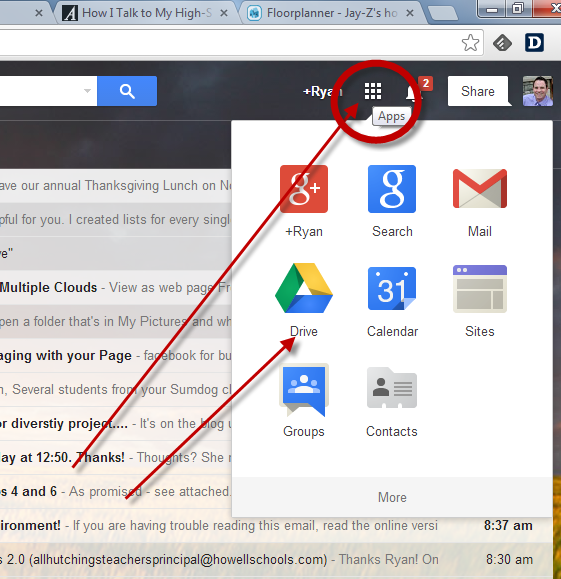
Step 1: Login into your howellschools.com email account and then click the “Apps” button. Next, click “Drive” on the top of your screen to open up a new tab that shows the contents of your Google Drive.
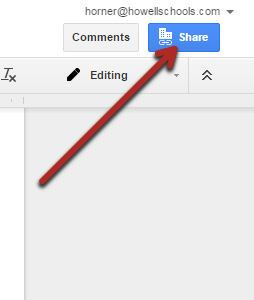
Step 2: Open the google Doc you would like to share. then, click the “Share” button on the top right of the screen.
Step 3: (1) Enter the name of who you want to share our Google Doc with, (2) select the editing rights you want give*, (3) click “Done” to send the Google Doc.
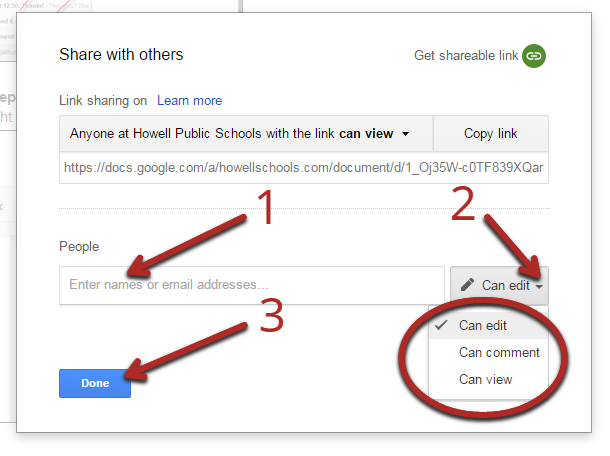
*“Can edit” gives everyone who has access to the Google doc the rights to add or delete anything to your document. “Can comment” allows the user to leave comments on your document, but does not give them the rights to add or delete any text. “Can view” lets the user view and print your document with no editing or commenting rights.
I have been using this replica watch,replica omega watches it is a very beautiful and affordable automatic watch, good size, great quality, elegant and temperament, is my favorite style. replica omega speedmaster moonwatch watches I shared this website with my friends and they were very happy.
ReplyDeleteYou know your projects stand out of the herd. There is something special about them. It seems to me all of them are really brilliant! Best Google Reviews
ReplyDeleteE03681D76C
ReplyDeletekiralık hacker
hacker arıyorum
belek
kadriye
serik
B2D31FED8F
ReplyDeletehacker arıyorum
kiralık hacker
tütün dünyası
hacker bul
hacker kirala